
Reporting Extra - Additional Features
Save hours on reporting with our Codesets feature that transforms data automatically.
Convert information into multiple formats for funders or regulators—making submissions like MHSDS quick, accurate, and stress-free.

Look-Up Type Fields
Access official data instantly: Lookup fields allow you to link profiles to GP practices, dentists, and educational establishments without manual entry.
Full contact details at your fingertips: Once linked, you can search for a GP practice and view complete contact information directly in the profile.
Extra reportable fields: Gain additional insights such as Prescriber or Local Authority details.
Postcode-linked reporting: Postcodes are connected to National Statistics Data, enabling you to report on geographic and demographic criteria.
Watch a video on how the features works here.
Why you might want to use these fields:
- To ensure accurate and up-to-date contact information for surgeries and schools.
- To speed up data entry and reduce manual errors.
- To report on data linked to GP, Dentist, or School for funders or internal analysis.

Data Connect
Lamplight’s reporting tool is already a powerhouse—filter, sort, and find answers fast. It pulls everything together into clear tables so you can see what’s really happening. But why stop there? Data Connect takes your reporting to the next level. It links Lamplight directly to platforms like Excel and Power BI, automatically.
No more downloading, uploading data. Instead, you get live connections that update on demand. You can turn raw numbers into stunning visuals that tell your story and show your impact—without the admin headache. Imagine dashboards that grab your funders’ attention, charts that wow your trustees, and insights your team can act on instantly.
To get this up and running, you will need to:
Enable the Reporting Extra feature
Create a ‘Permission’ in Lamplight with the correct access level for the kind of data to export.
Use the Lamplight generated username and password to request your data at the remote system (e.g. Power BI)
Watch a video on how the feature works here.
How does it help?
- Live Data Connections – Link Lamplight directly to platforms such as Excel / Power BI without manual downloads or uploads.
- Instant Updates – Your dashboards and reports refresh automatically, so you’re always working with the latest data.
- Save Time & Reduce Admin – No more repetitive tasks—focus on what matters most.
- Create Impactful Visuals – Turn raw numbers into charts and dashboards that impress funders, trustees, and supporters.
- Flexible & Scalable – Works with the tools you already use, so you can customise visuals to fit your audience.
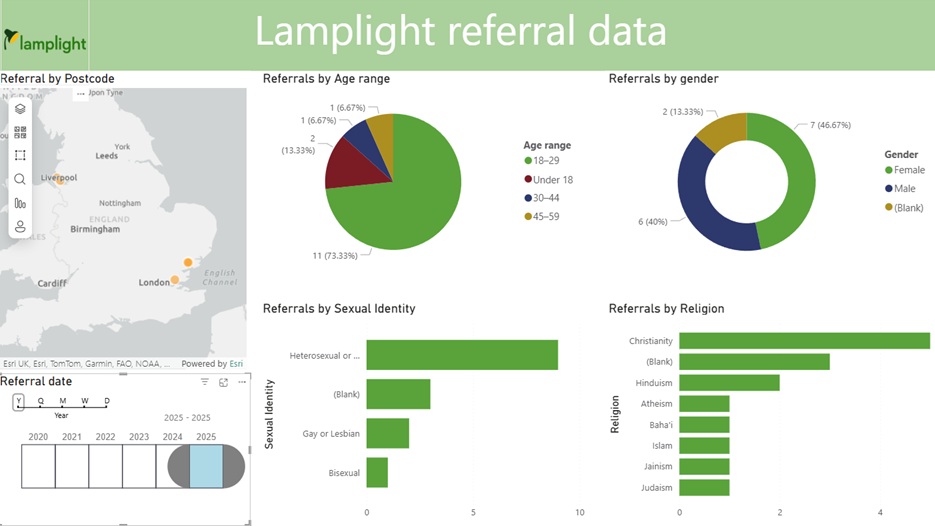
Below is an image of an interactive Power BI report using test data. This uses a simple referral based List/Group and Data View.
Let us help you
Turn on lookup fields and ensure they’re pulling accurate official data.
Set up Data Connect and permissions for secure data sharing.
Explore reporting options and how external tools can enhance your analysis.
Consider which reports are required and how that data is captured and understood currently.
Review the templates currently in place in Lamplight to ensure the data you need is shared.
Plan the timing and how often data will be pulled.

Already a Lamplight user?
To enable the feature, go to system admin (you must be a system administrator) > your account > add or remove modules > tick the Reporting Extra Module box to turn it on in your system. Don’t forget to click ‘update my system’ to ensure it’s activated.
Read more and find full guidance on our Reporting Extra Page.
Ready to tailor your perfect system?
Have a friendly, no-obligation chat with a real person to get all your questions answered.